




Reachy Mini is a small, expressive, open-source robot: a head that moves on six degrees of freedom, two animated antennas, a microphone, a speaker and a camera. On paper it is a desktop companion. In practice it has become something more interesting: a platform that anyone can build for, in minutes, often without writing a single line of code.
This article is about the software decisions that made this possible. The main one is simple to state: apps no longer have to run on the robot. They started as Python programs installed next to the daemon - on the robot's own Raspberry Pi for the wireless version - and that architecture is still there and still makes sense when code belongs close to the hardware. What is new is that an app can now also be plain JavaScript running in whatever client you already have open - a browser tab, the mobile app, a Hugging Face Space - because the robot exposes everything it can do over the network:
The thesis
Seen from a client, Reachy Mini is an endpoint you connect to: audio, video and motor control travel over a single WebRTC connection that works the same whether you are next to the robot or on the other side of the planet.
The two halves depend on each other. Apps can only live client-side because one low-latency connection carries everything the robot can do, across networks. And the single connection is only interesting because the code consuming it runs anywhere a browser runs. Put together: streaming the robot's microphone to a realtime speech model is the same primitive as nudging its head 5 degrees to the left, and running an app on your laptop is the same as running it from a phone, or from a Hugging Face Space someone vibe-coded an hour ago - with nothing to install on the robot.
In the pages that follow we will trace that idea through the whole stack:
- WebRTC for everything - less is more.
- The signaling central and the SDK - how two clients find each other and shake hands, then get out of the way.
- The connection in action - one demo app that exercises every leg of the same link.
- Interchangeable clients - why a browser, the mobile app, and a community Space are all the same kind of consumer.
- Apps and the app catalogue - how third-party apps run safely inside the official clients.
- The vibe-coding loop - coding agents and AI-generated personalities.
WebRTC for everything
Here is the whole ecosystem on one page. Hardware on the left, software in the middle, and the clients that talk to the robot on the right. The arrow labelled "via WebRTC - Local OR Internet" is the one this article is about.
The old way: media on WebRTC, control apart
One thing is not new here: the camera and the microphone have streamed over WebRTC since the robot's first release - how that pipeline is built is the media stack article's story. What lived apart was everything else:
- HTTP/REST and WebSockets carried commands and state - fine for "set this value", awkward for anything streaming or real-time, and they assumed the client sat on the same network as the robot.
- A heavy client: consuming the media streams outside a browser meant a GStreamer stack alongside the Python SDK - fine on a laptop, out of reach for a phone or a plain web page.
Every new feature meant deciding which path it belonged to, gluing the paths together, and re-solving reconnection and security per path. The hard parts were paid for again and again.
What did not change: BLE
One transport survived on purpose. First-boot setup - discovering the robot, getting it onto your Wi-Fi, pushing recovery updates - still happens over Bluetooth Low Energy from the mobile app, because it has to work before the robot has any network at all. WebRTC takes over once the robot is online.
The new model: one connection, three payloads
The consolidation moves control onto the connection the media already rides: WebRTC natively carries three kinds of payload on a single peer-to-peer connection, and motor control becomes the third:
Moving a motor and streaming a voice become the same kind of operation: frames on one link. And the properties that used to be re-implemented per channel come with the standard: NAT traversal so the connection forms across networks, and DTLS/SRTP encryption everywhere. (The standard also specifies congestion control so quality degrades before the connection drops - our pipeline does not enable it yet; it is on the list.)
Local OR Internet, transparently
WebRTC negotiates the best path between the two peers, so the same code streams over your LAN when you are in the room and relays over the internet when you are not. The application never knows which one it got. One precision: "local" describes the media and data path - the initial handshake still reaches the signaling central over the internet, unless the client talks directly to the signaling server every robot runs on board.
What this buys
Some of the payoff is direct simplification: there is one connection to open, secure and monitor instead of three or four.
- A realtime conversation is "subscribe to audio in both directions".
- A vision feature is "grab a frame from the video track".
- A dance is "push a sequence of poses onto the data channel".
- Reconnection, encryption and NAT traversal are solved once, not once per channel.
And some of it is new freedom: since any browser can open a WebRTC connection, being a client no longer requires a native media stack. Nothing changed on the robot's side - what changed is who can call it: where consuming the streams used to mean a Python process with GStreamer beside it, a phone, a laptop and a generated web page now connect identically, with nothing to install. And heavy processing - a vision model, an audio pipeline - can run on the client's hardware instead of the Pi.
One piece has to exist before the WebRTC link can form: something to introduce the two peers. That is the signaling central, covered next.
The signaling central and the SDK
A WebRTC connection is peer-to-peer, but the two peers still need a way to find each other and exchange the initial connection details. Every robot already runs its own small signaling server for that, next to the daemon. What the signaling central (reachy_mini_central), a small Hugging Face Space, adds in front of those is a meeting point that works across networks - an authenticated filter and pass-through, not a brain. It does three things:
- Registration - each robot's daemon announces itself to the central and stays reachable through it, even behind a home router.
- Discovery - an authenticated client asks "which robots can I use?" and gets back the list tied to its Hugging Face account.
- Handshake relay - the client and the robot swap their WebRTC offer, answer and ICE candidates through the central, just long enough to establish the direct link.
Once the peer connection is up, the central is out of the loop: audio, video and motor commands flow directly between client and robot, and never through it.
Auth rides on Hugging Face
Discovery is gated by the user's Hugging Face token, so a client only ever sees the robots that belong to its account. There is no long-lived robot password to leak; identity is the same one you already use across the Hub.
The SDK hides all of it
App authors never touch any of the above. The JavaScript SDK (which lives in the reachy_mini repo) wraps the whole bring-up behind a single call:
const robot = new ReachyMini();
await robot.autoConnect(); // auth + discovery + session + wake-up
autoConnect() performs the OAuth check, connects to the central, picks the
robot (automatically if there is exactly one free, otherwise via a callback the
app supplies), starts the session, and wakes the robot up. The earlier
multi-step chain - connect, wait for robotsChanged, startSession,
ensureAwake - is one method now.
After that, driving the robot is a few method calls that the SDK serializes onto the WebRTC data channel:
robot.setHeadRpyDeg(0, 10, -20); // roll, pitch, yaw - streamed as a target
await robot.playMove("happy"); // a recorded move, played by the daemon
const detach = robot.attachVideo(videoEl); // live camera (audio comes along)
Those three are just the surface. The full command set covers the whole robot - motion, camera, audio, motors, diagnostics - and it all rides the same connection:
Connect & session
| Command | What it does |
|---|---|
autoConnect() | Auth + discovery + robot pick + session + wake-up, in one call |
authenticate() / login() / logout() | Hugging Face OAuth: silent check, redirect, sign-out |
connect() / disconnect() | Join / leave the signaling central |
startSession(robotId) / stopSession() | Claim / release one robot |
setAutoReconnect(on) | Re-establish the link automatically after a drop |
Motion
| Command | What it does |
|---|---|
setHeadRpyDeg(roll, pitch, yaw) | Stream a head orientation target |
setAntennasDeg(right, left) | Point the antennas |
setBodyYawDeg(yaw) | Rotate the body |
setTarget(...) / gotoTarget(...) | Raw pose targets: streamed, or interpolated by the daemon |
playMove(move) / cancelMove() | Play / stop a recorded move from the Hub |
wakeUp() / gotoSleep() / isAwake() / ensureAwake() | The sleep-wake lifecycle |
setMotorMode(mode) | enabled, disabled, or gravity_compensation - the marionette mode |
setMotorTorque(on, ids?) | Torque on/off, per motor if needed |
Camera & tracking
| Command | What it does |
|---|---|
attachVideo(el) | Live camera in a <video> element - robot audio comes along |
startHeadTracking() / stopHeadTracking() | Daemon-side face tracking on/off |
getTrackedFace() | Where the tracked face currently is |
subscribePose() / unsubscribePose() | Live pose stream from the robot |
Audio
| Command | What it does |
|---|---|
playSound(file) | Play one of the daemon's built-in sounds |
uploadAudio() / playUploadedAudio() / cancelAudio() | Ship your own audio to the robot and play it |
setMicMuted(on) / setAudioMuted(on) | Mute either direction |
getVolume() / setVolume(v) | Speaker level (same pair exists for the microphone) |
clearIncomingAudio() | Flush whatever is queued on the speaker |
applyAudioConfig() / readAudioParameter(name) | Tune the onboard audio processor |
Robot & diagnostics
| Command | What it does |
|---|---|
getRobotName() / setRobotName(name) | Read / rename the robot |
getVersion() / getHardwareId() | Daemon version and hardware identity |
startDaemonUpdate() | Trigger a robot self-update |
requestState() / subscribeLogs() | State snapshot, live daemon log stream |
onNotification(cb) | Daemon-side events (update progress, warnings...) |
sendRaw(data) | Escape hatch: raw frames on the data channel |
Standalone vs embedded apps (the iframe case)
An app can run standalone (the user opens its Space URL directly) or
embedded in a host shell such as the mobile app. Hugging Face blocks its OAuth page from being framed
(X-Frame-Options: SAMEORIGIN), so logging in inside an iframe is impossible.
The host solves this by pre-authenticating and pre-selecting a robot, then
handing both to the embed through the iframe URL (and, for cross-origin hosts,
via postMessage). The SDK auto-detects embed mode and consumes those
credentials, so autoConnect() behaves identically in both cases. App authors
write one code path; the SDK absorbs the difference.
A contract that only grows
There is one more design rule holding this together, and it is easy to miss
because it shows up as an absence: nothing in the ecosystem updates in
lockstep. An app is a Space that bundled the SDK on the day it was published
and may never rebuild. Robots update their daemon on their own schedule - or
not at all. So every wire contract in the stack is frozen, and evolves by
addition only: a new capability is a new optional field or a new message
type, never a change to what already exists. The host-embed protocol carries
version: 1 on every message, and bumping that integer is the only way a
breaking change could ship - it has never happened.
The other half of the rule is behavioral: receivers ignore what they don't understand. An older daemon silently drops a command it doesn't know, and the SDK resolves the call as "unsupported" instead of hanging. An older app skips a message type that didn't exist when it was bundled. A newer daemon treats a missing field as its documented default. The result is that version skew is survivable in both directions: a two-year-old app drives a freshly updated robot, and yesterday's app update still talks to a robot that has never been updated at all.
The connection in action
One transport, a central that introduces two peers and steps aside, an SDK that
reduces bring-up to autoConnect(). The fastest way to see what that buys is a
single app that exercises all of it: the
SDK JS Demo App,
a Space that puts a control on essentially every command from the tables above.
It doubles as a reference implementation to crib from when building your own
app.
An ordinary app, deliberately
The demo app has no special access. It is a plain Hugging Face Space (tagged
reachy_mini_js_app) that mounts the host shell and receives a
connected ReachyMini instance - exactly like any community app.
Everything below is available to anyone's Space on day one.
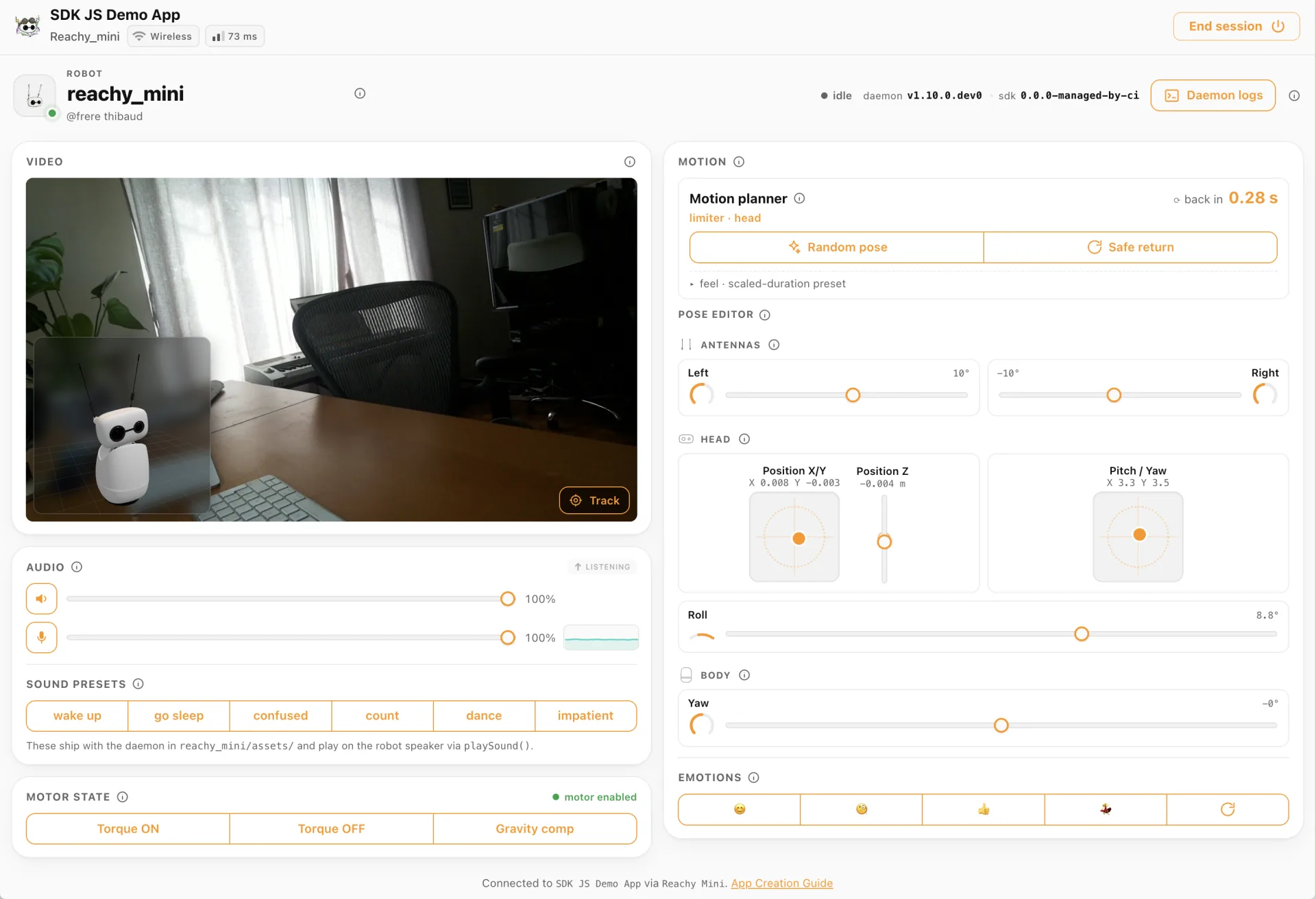
Every panel in that screenshot maps onto one leg of the connection.
The video leg is the live feed in the corner: one attachVideo(videoEl)
call and the robot's camera plays in a <video> element, with the robot's
microphone pulled along on the same track. This is also the local OR internet
claim from earlier, made concrete: the same Space, the same autoConnect(),
shows a robot on your desk over the LAN or one in another country over a
relayed link - and the app never learns which one it got.
The audio leg is the sound panel: built-in presets play through
playSound(), your own files ship over with uploadAudio(), and volume and
mute controls cover both directions of the stream.
The data channel is everything else on the page, in both directions. The
pose editor streams setHeadRpyDeg() targets as you drag the sliders, the
emotion buttons fire playMove(), the motor panel flips torque and control
modes - and the same channel talks back: the daemon logs pane
(subscribeLogs()) and the live pose readout (subscribePose()) are the robot
streaming to the app over the very link that drives it.
The toggle that used to be an app
One switch in the video panel deserves its own story. Head tracking - the robot
following the closest face - started life as a separate app: the camera arrived
over WebRTC, MediaPipe BlazeFace (WASM, on the CPU, in the browser) detected
faces at 10-15 fps, and a linear mapping streamed (yaw, pitch) targets back
at ~30 Hz. The loop closed through the physical world, with the detector
running on the client and only angles crossing the network.
That prototype worked well enough that the feature moved into the daemon. Face
tracking now runs on the robot itself, and what used to be a whole app is a
single SDK call - startHeadTracking() - that any app can toggle over the data
channel. It is the introduction's claim played out in miniature: the client is
where a feature can be built and proven in an afternoon, and the robot is where
it settles once it earns its place next to the hardware.
Clients are interchangeable
If every client opens the same WebRTC connection through the same SDK, then no single client is special. The browser demo, the official mobile app, and a community-built Space are all consumers of the robot. They differ in packaging, not in how they talk to the hardware.
The whole platform fits in one picture: several ways to reach a robot on the left, a single SDK speaking WebRTC in the middle, and two hardware variants on the right - the same connection working both on the local network and across the internet.
One SDK, one transport, many clients
| Client | What it is | How it connects |
|---|---|---|
| Browser | A web page using the SDK directly | autoConnect() over WebRTC |
| Mobile app | A native shell wrapping a web frontend | same SDK, same WebRTC |
| Apps | Hugging Face Spaces, run standalone or embedded | same SDK, same WebRTC |
The mobile app is "just a client" too
The mobile app is the most polished consumer, and a good test of the principle. Under the hood it is a Tauri 2 shell (a thin Rust layer) wrapping a React 19 frontend - not a React Native rewrite. The robot-facing logic is the same JS SDK every other client bundles; the native layer adds only what a phone needs: app-store packaging, system OAuth, screen wake-lock, and Bluetooth.
The one native exception: setup
Bluetooth is where "just a client" stops being literally true: first-boot setup runs over BLE, as covered earlier. Everything else the app does - conversation, joystick, camera, launching Hub apps - is the same WebRTC connection as everyone else's.
Why interchangeability matters
Treating clients as interchangeable has consequences beyond engineering convenience:
- No lock-in to one UI. The official clients are reference implementations, not gatekeepers. Anything that can run the SDK can drive the robot.
- Apps are first-class. A Space someone published is not a second-class citizen poking at a limited API - it has the same access as the official app, because it opens the same connection.
- Handoff is cheap. The mobile app can release its session, let an embedded app take over the robot, and reacquire it afterwards, because a session is a uniform, transferable thing.
That third point - an official client temporarily handing the robot to a third-party app - is where the platform opens up, and where safety has to be taken seriously. The next section covers how apps are catalogued, embedded and filtered.
Apps, the catalogue, and safe embedding
The apps this section is about are Hugging Face Spaces that use the JS SDK -
static files served from the Hub, running in the client that loads them, with
nothing installed on the robot or on the phone. Because each app declares
itself with a single Space tag (reachy_mini_js_app in its
README.md), it can be discovered, embedded and handed the live
robot - running one is just loading a page.
The app catalogue
The directory of available apps is served by a small API - the reachy-mini-api Space - which clients query for the list of installable apps, with metadata and filtering. The data behind it lives in the reachy_mini_store_data dataset. Pair that with the community convention of publishing Reachy Mini apps as searchable Spaces on the Hub, and you get a store anyone can contribute to.
Curation, not gatekeeping
The catalogue is driven by a few configuration lists in the dataset:
official-app-list.json (the trusted, featured apps),
blocked-app-list.json (apps removed from circulation), and
taxonomy.json (how apps are categorised). Publishing is open;
curation keeps the surface navigable.
Running an app inside a client
When you open an app from within the mobile app or the web client, it does not launch a separate program - it loads the app's Space in a sandboxed iframe and hands the robot over:
The host releases its WebRTC slot, loads the app with an embedded flag, and
forwards the user's Hugging Face token so the embedded app can connect without
showing another login screen. When the user closes the app, the host reacquires
the robot. None of this would work that easily with installed programs: the handoff exists
because an app is a page any iframe can load, and a session is a thing that can
be released and picked back up.
The host shell: any app, any browser, one login
The mobile app is one way to reach apps, but not the only one. The same handoff
machinery is packaged as a standalone host shell - published as the
reachy-mini-host Space
and shipped in the SDK as mountHost(). It turns any plain browser into a
fully-featured Reachy Mini client.
One shell, every app, one sign-in
Open the host in a browser, point it at any community app with
?app=<owner>/<space>, and it runs that app fully
connected to your robot - no mobile app, and no separate login per app. The
host owns Hugging Face OAuth, the robot picker and the session lifecycle
once, then lends that connection to whatever app you load.
Instead of every app re-implementing sign-in, robot discovery and connection
handling, the host does all of it and hands the running app a ready-to-use
ReachyMini instance. App authors ship only their app; the shell provides the
plumbing.
// host.ts - the entire shell, for any app
import { mountHost } from "@pollen-robotics/reachy-mini-sdk/host/auto";
mountHost({ appName: "My App", appIconUrl: "/icon.svg" });

// embed.ts - what runs inside the iframe, already connected
import { connectToHost } from "@pollen-robotics/reachy-mini-sdk/host/embed";
const handle = await connectToHost();
handle.reachy.setHeadRpyDeg(0, 10, 0);
The shell renders the top bar, the sign-in screen, the robot picker and the connecting / leaving overlays; the embed wakes the robot and drives it. The exact same app code runs standalone in a browser tab (full OAuth -> picker -> iframe) and embedded in the mobile app (credentials pre-injected, no picker) - only the entry point differs.
Because the host is "just a Space", you can share a link to any app the same way you share a web page - the recipient signs in with their own Hugging Face account and uses their own robot.
The harmful-content filter
Handing a real, moving robot to arbitrary third-party code needs guardrails.
The ecosystem includes an LLM harmful-content filter that screens app
content against a taxonomy and marks it ALLOWED or blocked before it reaches
users. Combined with the blocklist, it keeps publishing as easy as pushing a
Space while keeping clearly unsafe or abusive content out of the official
clients.
With this machinery in place, the loop closes: an ordinary person can describe an app, have an AI write it, preview it on their real robot, and publish it to the catalogue. That loop is the next section.
The vibe-coding loop
Everything so far - one transport, a central that steps aside, an SDK that hides the plumbing, interchangeable clients, a safe way to embed apps - adds up to make one thing possible: letting a person go from an idea in plain language to a running app on a real robot in minutes. There are two ways to use that, and they sit on the same foundation.
1. Vibe-code with your own agent
You can stay in your editor: the project meets you there. Point
any coding agent - Claude Code, Codex, Copilot - at the repo's
AGENTS.md and describe your idea:
I'd like to create a Reachy Mini app. Start by reading AGENTS.md. I want my app to do [your idea here].
That guide hands the agent the SDK patterns, best practices, example apps and a
golden-path scaffold (create-js-app). The destination is a Space that uses
the SDK over WebRTC - reached through your own tools, with full control over
the code.
2. Vibe-coding the robot's behaviour
The same idea - describe it, let an LLM generate it - applies not just to apps but to the robot's personality. In the mobile app, you can type a one-line vibe like "a grumpy French chef who insults your cooking" and an LLM turns it into a complete persona: a name, a tagline, a full set of system instructions, and a matching voice. A dedicated Space generates a sticker avatar to go with it.
Under the hood the conversation runs over the same WebRTC link: the robot's microphone streams up to a realtime speech model, the model's voice streams back to the speaker, and the model can call tools to move the head, play a recorded emotion, glance through the camera, or remember something about you. Composing a character becomes something anyone can do, no code required.
The common shape
Your own coding agent and a natural-language personality editor both reduce to the same operation: describe intent, get something that drives the robot over a uniform connection. The vibe-coding loop is not a feature bolted on top - it is the natural consequence of making the transport, the SDK and the embedding contract uniform all the way down.
TL;DR
Reachy Mini is an open robot, but what turned it into a platform is a change in where code can run. Apps are no longer tied to the robot; to a client, the robot is an endpoint.
The chain, in order:
- One WebRTC connection carries audio, video and motor control - encrypted, across NATs, local or remote. (BLE keeps the one job WebRTC cannot do: setting up a robot that is not on any network yet.)
- The signaling central introduces a client to a robot and steps aside;
the SDK reduces the whole bring-up to
autoConnect(). - Because connecting is uniform and apps can run client-side, clients are interchangeable: the browser, the mobile app and community Spaces are the same kind of consumer.
- Because an app is a static page and a session can be handed over, official clients can safely embed third-party apps, curated by a catalogue and screened by a content filter.
- And because a working app is now three static files and one SDK call, an LLM can write one: describe an app or a personality, watch it run on your robot in seconds, publish it for everyone.
The takeaway
Letting apps live off the robot did more than clean up the architecture. It made the unit of contribution small enough - a static Space, one call to connect - that both people and coding agents can produce one in minutes.
The pieces are open. The SDK is plain JavaScript, the apps are ordinary Hugging Face Spaces, and a coding agent will write the first one with you. If you have a Reachy Mini - or just an idea for what one should do - the shortest path from here is to describe it and watch it move.
This deep dive stayed on the transport and the control path. Its natural companion is the other half of the same pipeline - how the camera and the microphones actually stream, seen from the media side:
Eyes, ears, and a voice: building Reachy Mini's media stack
How Reachy Mini streams audio and video. The camera, the microphone array, and GStreamer + WebRTC that let the same code work whether an app runs on the robot, your laptop, or a GPU-backed Hugging Face Space.
And if you landed here first, the wider tour of what all this lets you do - talk to the robot, add abilities, vibe-code new ones - is a good place to zoom back out:
A galaxy in your palm
A year of software around Reachy Mini, in three moves: talk to it out of the box, add an ability from the store in one tap, and build the one that does not exist yet. No robotics background needed.